
Fair allocation when supply is limited
Allocation Quotas lets a Shopify store decide who can order how much, and when. Limits are set for each customer group, reset automatically each period, and are enforced before checkout, with no spreadsheets and no manual order holds.
Built for a real depot
Made for a vaccine depot supplying pharmacies, clinics and hospitals
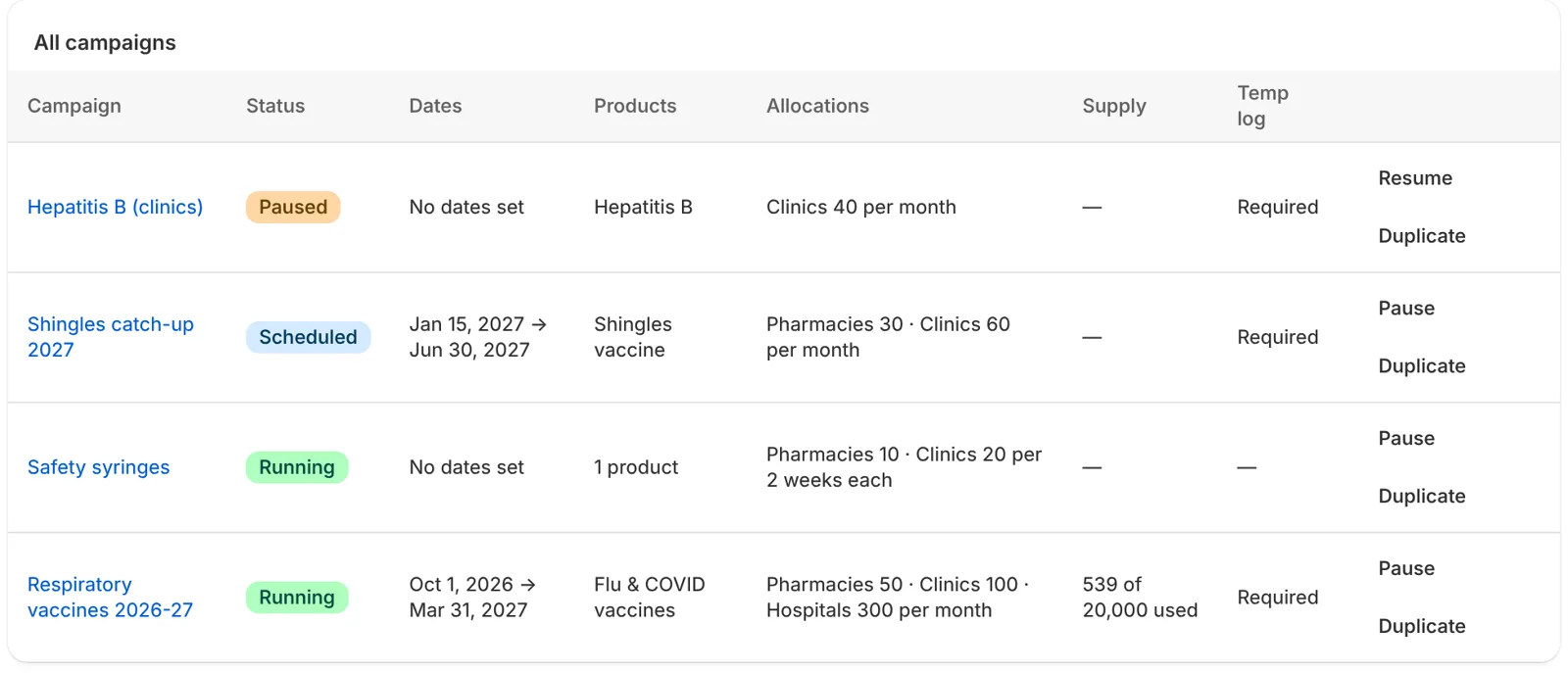
A seasonal campaign such as "Respiratory vaccines 2026-27" sets the products, the dates and a per-period limit for each customer group. Each customer keeps their own running total, and it resets automatically.
- Cancellations, refunds and edits give allocation back automatically
- Import the last 60 days of orders when you install
- Works with any product that's in short supply, not only vaccines
Features
Everything allocation needs, inside Shopify
Staff manage it from Shopify admin, and customers see their allocations right in the store.
Campaigns
Each campaign has its products (a collection, products, tags or a mix), start and end dates, and a limit for each customer group. Campaigns switch on and off by themselves, and you can copy one to next season.
Customer groups
Groups use the Shopify customer tags you already have, such as pharmacy, clinic or hospital. You can give a customer a custom allocation, and every adjustment records who made it.
Periods that reset themselves
Limits renew every set number of days, weeks, months or years. Everyone can renew on the same date, or each customer's period can start at their first order.
Enforced in the storefront
Product pages show the remaining allocation and the next refresh date and cap the quantity. Add-to-cart requests are checked first, and the cart explains any problem before checkout.
Temperature logs
Require a refrigerator temperature log with every order. Files are checked as they are uploaded, and reviewers download them from the Shopify order page.
Reviews and dose requests
Staff work through a review queue. Customers can ask for extra allocation, and approvals apply straight away.
Supply caps and reports
Cap a campaign's total supply, pause ordering in one click, and report on usage by campaign, group and customer.
Help and training built in
Every screen links to its own guide, and there's a ready-made training plan for new staff. Customers get a how-to-order guide in the store.

For your customers
Customers always know where they stand
The My allocations page shows each campaign, how much is left this period and when it refreshes, plus requests for extra doses and recent orders with their temperature logs.
Screenshots show demo data.
Allocating limited stock on Shopify?
We'll show you Allocation Quotas with your own products and customer groups, and adapt it to how you work.